 (enlarge)
This is a sample implementation of ASP.NET MVC4, MongoDB and Ninject to act as a starting template if you are going to use these technologies in your project with a CQRS pattern.
Audience
If most of these terms look unfamiliar then this post is probably not for you: CQRS, Repository, Aggregate (of DDD), NuGet, Unit Testing, Dependency Injection, Document DB. Due to the scope of this post, I won’t be able to go into detail on any of these topics as this is a direct implementation.
Greg Young wrote a short intro to CQRS here: CQRS, Task Based UIs, Event Sourcing agh (new tab). If you want a simple introduction, I recommend reading at least the first half of Greg’s post (before the Event Sourcing part).
Scope and Definition
In this post, I mean the plain-CQRS pattern and not all the patterns that are associated with CQRS. Plain CQRS opens the door to other patterns such as Event Sourcing, which is usually associated with CQRS. This is the plain CQRS with no other associated pattern.
Choice of Technology
I chose MongoDB for its open license policy and simplicity, and Ninject for its license, its simplicity and the Ninject.Extensions.Conventions extension that makes my code DRYer.
I could have chosen SQL Server, but for simplicity reasons and to get the idea across, Document DBs are easier to work with. You could also tweak this sample implementation to work on an RDBMS as long as you get the repository right.
Task Application
 (enlarge)
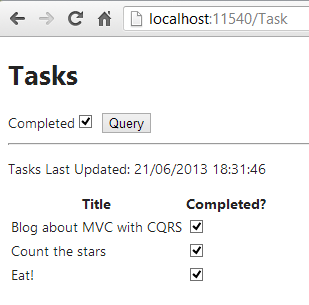
This is meant to be a trivial application, so that the focus is shifted from the features to the MVC with CQRS pattern. The application:
- Enables querying the tasks. When the user clicks “Query”, if the Completed checkbox is selected, it will display completed tasks, and if it is not selected, it will display incomplete tasks. This is meant to represent the start of a CQRS’s Query.
- Checking or unchecking any checkbox in the “Completed?” column will update the task, via Ajax. This is meant to represent the start of a CQRS’s Command.
- Has no way to add or delete tasks. To load sample tasks into the DB, I have included, in the download, a MongoDB script that will populate the DB.
Why use CQRS with MVC?
I recently wrote You should unit test your controller, NOT!, where I gave guidelines that an MVC controller should have almost no code, so it doesn’t even require unit testing, but it is really difficult to show how to achieve this within the scope of that post.
Using CQRS enforces better separation of concerns and produces an almost-empty controller, where the viewmodel turns into a query when getting data, or into a command when posting data.
 (enlarge)
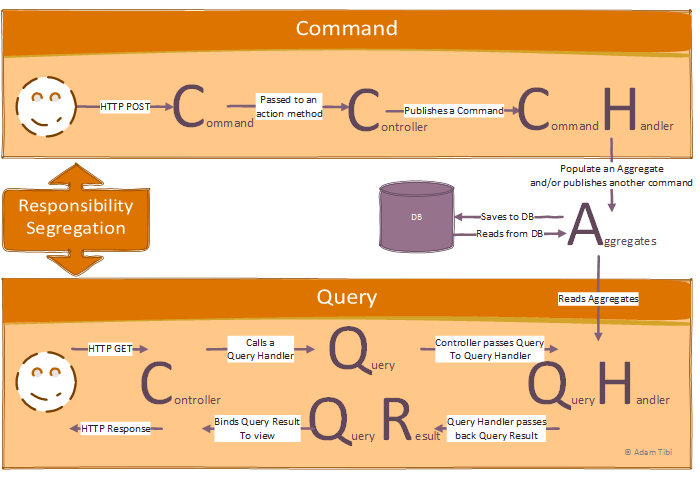
The diagram above is a sketch of the solution; it will get clearer as you progress through the post and read the source code.
Solution Structure
 (enlarge)
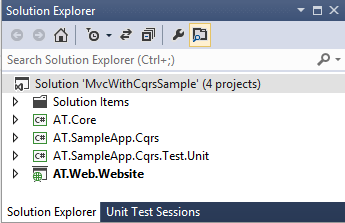
First, whenever you notice the use of “AT” in the namespace, you can replace that with your company name, as you’ve already concluded, ehmm, AT are my initials.
The solution is using VS 2012 and has four projects:
AT.Core: This is where the infrastructure classes are, such as the CQRS infrastructure classes.AT.SampleApp.Cqrs: Commands, command handlers, queries, query handlers, query results and domain classes. This is where your business logic is. This project referencesAT.Core. In this sample project it has one sample queryTasksByStatusQueryand one commandChangeTaskStatusCommand.AT.SampleApp.Cqrs.Test.Unit: Unit tests for theAT.SampleApp.Cqrsproject. They follow the conventions specified in The Art of Unit Testing: with Examples in .NET by Roy Osherove (new tab), which I recommend you read. It is a bit outdated; however, a newer edition is in the works as I write this.AT.Web.Website: ASP.NET MVC4 project that referencesAT.CoreandAT.SampleApp.Cqrs
The Code
I felt the best way to show the pattern is to walk through the code as if I were debugging it, showing what happens at each stage. I find this the fastest way to learn — we spend half our lives debugging!
The Command
The user clicks the “Completed?” checkbox for one task to mark it as completed, which executes the following JavaScript/jQuery:
$.post("/Task/ChangeTaskStatus",
    {
    "TaskId": $(this).data("id"),
    "IsCompleted": this.checked,
    "UpdatedOn": formattedNow
    }
);
Command & Controller
The post request reaches the ChangeTaskStatus action method and becomes a command:
public class TaskController : Controller
{
    private readonly IQueryDispatcher _queryDispatcher;
    private readonly ICommandDispatcher _commandDispatcher;

    public TaskController(IQueryDispatcher queryDispatcher,
                          ICommandDispatcher commandDispatcher)
    {
        _queryDispatcher = queryDispatcher;
        _commandDispatcher = commandDispatcher;
    }

    [HttpPost]
    public ActionResult ChangeTaskStatus(ChangeTaskStatusCommand command)
    {
        _commandDispatcher.Dispatch(command);

        return new HttpStatusCodeResult(HttpStatusCode.Accepted);
    }

    // other action methods
}
Starting with the easier bit of the ChangeTaskStatus method, the action method returns an HTTP code to the client to say that everything is fine.
Command Dispatcher
_commandDispatcher.Dispatch takes a command and relies on dependency injection to find a handler for this command; in this case, it will match the ChangeTaskStatusCommand with ChangeTaskStatusCommandHandler.
Why rely on dependency injection rather than calling the command handler directly? Simple answer: decoupling. The controller doesn’t know much about what is happening; it is just dispatching (some call it publishing, but publishing might convey an async call or a bus call) a command “to whom it may concern,” and the proper handler will pick it up and process it.
The _commandDispatcher is injected into the controller as well. We will see what it does in more detail, but first let’s look at the dependency injector code. For this I have used Ninject and Ninject.Extensions.Conventions from NuGet, and this is the kernel code:
kernel.Bind(x => x.FromAssembliesMatching("AT.Core.dll", "AT.Web.Website.dll")
      .SelectAllClasses().BindDefaultInterface());
BindDefaultInterface is simply saying bind ISomething to Something by convention, so, the first line injects the dispatchers into the controller.
Now, this dispatch method, how does it work? How does it match the command to its handler?
public void Dispatch<TParameter>(TParameter command) where TParameter : ICommand
{
    var handler = _kernel.Get<ICommandHandler<TParameter>>();
    handler.Execute(command);
}
_kernel is Ninject; it queries, at run time, for the handler of the passed command and then calls its Execute method to pass it the command.
You’ve got to like the fact that dependency injectors promote decoupling, but your modules become coupled to them! Maybe we need a second-level dependency injector to decouple the first one. But, Ninject has a cool logo, so I don’t mind my modules depending on it 🙂
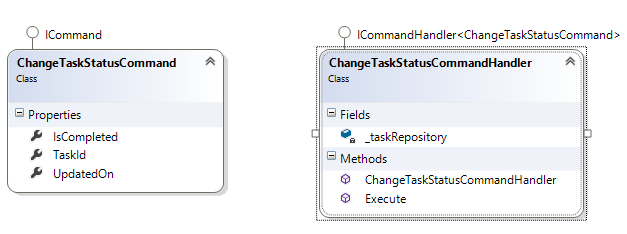
Command Handler
 (enlarge)
This is where the business logic lives. The handler might mutate state, save to the DB (or more accurately, persist through a repository), call another handler, and so on.
This is the ChangeTaskStatusCommandHandler Execute method:
public void Execute(ChangeTaskStatusCommand command)
{
    if (command == null) { throw new ArgumentNullException("command"); }
    if (string.IsNullOrWhiteSpace(command.TaskId)) {
        throw new ArgumentException("Id is not specified", "command");
    }

    var task = _taskRepository.All().Single(x => x.Id == command.TaskId);
    task.IsCompleted = command.IsCompleted;
    task.LastUpdated = command.UpdatedOn;

    _taskRepository.Update(task);
}
Please keep in mind, what we are doing here as business logic is super simplistic and doesn’t show the true power of the CQRS pattern, but it does give you an idea.
Binding via Ninject (this code will apply to all my handlers, not just this one):
kernel.Bind(x => x.FromAssembliesMatching("AT.SampleApp.Cqrs.dll")
    .SelectAllClasses().InheritedFrom(typeof(ICommandHandler<>)).BindAllInterfaces());
Repository
I have used MongoDB as the storage medium, which you can install from NuGet. Rather than implementing the popular Repository DDD pattern myself, someone has already implemented it for MongoDB and packaged it up: look for MongoRepository on NuGet. I am simply using it as is, as you can see from the code above. I am using the following Ninject code to bind to it:
kernel.Bind(x => x.FromAssembliesMatching("AT.SampleApp.Cqrs.dll", "MongoRepository.dll")
    .SelectAllClasses().InheritedFrom(typeof(IRepository<>)).BindAllInterfaces());
Aggregate
This is a simple aggregate and I am persisting it as a document in MongoDB:
public class Task : IEntity
{
    [BsonId]
    [BsonRepresentation(BsonType.ObjectId)]
    public string Id { get; set; }
    public string Title { get; set; }
    public bool IsCompleted;
    public DateTime LastUpdated;
}
The Query
The query has a similar path to the command, with the following differences:
- The controller is calling the
_queryDispatcherexplicitly and not implicitly like the_commandDispatcher. - The query is two-way — the query and its results — while the command is one-way.
- There are many more differences, but I am looking at the differences from this project’s point of view.
Recap
I hope I was able to illustrate the diagram above. Feel free to ask in a comment if I made a mistake or if you have a question.
Let’s recap on the steps in which the command of CQRS was implemented.
- Command is triggered by the view.
- Command reaches the action method.
- The action method dispatches the command to a handler.
- The handler takes the command and does some business logic then persists it through a repository.
What’s Next?
This is only the basics and the first building block in your CQRS application. You will probably add other CQRS-related patterns on top of this. Here are some ideas to polish your architecture:
Base Controller
You might want to have a Base Controller and inject your dispatchers into it. Something like this:
public abstract class BaseController : Controller
{
    [Inject]
    public ICommandDispatcher CommandDispatcher { get; set; }
    [Inject]
    public IQueryDispatcher QueryDispatcher { get; set; }
}
Event Sourcing
Now that you have seen the basic pattern, what about looking further? Here is another good article with a different focus from what I’ve discussed here: Introduction to CQRS (new tab).
Enhancing the Basic Architecture
There is no logging and no error handling, of course — this is not meant for production, it is meant to be a sample. Make it production-ready 🙂
Conclusion
The results? Controllers are nearly empty, DRY code and a pattern that is open for unit testing. Obviously, the amount of code is overkill for such a small application, but this is only to trigger your software design imagination so you could apply this pattern to a real-life application (obviously not by forcing the pattern if it doesn’t fit).
I hope I made somebody’s day. If you liked this, do let me know in a comment and I will be encouraged to write more. While I tried to keep it short, this ran longer than I wanted. Note that the source code in the download area contains the complete code.
I am open to suggestions for improvement; do let me know your ideas in a comment.
Download
Using Visual Studio 2012 Ultimate. I had to delete all the NuGet files to keep the size down, so it will probably ask you to download these packages from NuGet when you try to build it.
MvcWithCqrsSample.zip (432 KB)
Disclaimer
I tried to ensure that the information posted here is up to date and accurate; however, I do not accept any responsibility for any damages that might occur from using or misusing the information and the posted code.