Microsoft is doing a good job of shipping standard front-end libraries with the Visual Studio 2012 “ASP.NET MVC 4 Web Application” and “ASP.NET Web Forms Application” templates; they are raising the bar for .NET web developers.
The VS template is a good starting point; however, I have been adding the libraries in this post to every new web project. They complement the ones shipped with VS, and I wanted to share them with you.
1 – CSS Normalizer
 (enlarge)
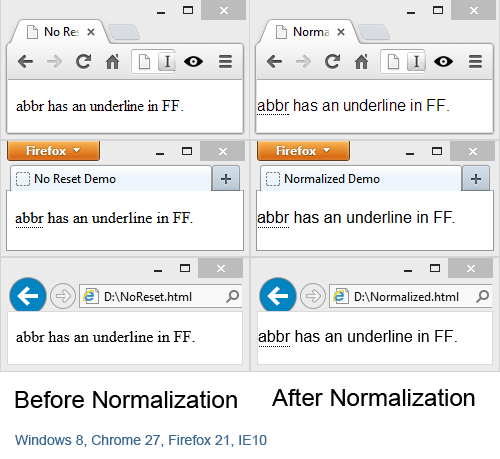
One common problem we used to face is that every browser has different default settings. If you don’t explicitly style an element (a tag), it may not look the same across browsers.
The image above shows the following code with and without resetting:
<abbr title="Title text">abbr</abbr> has an underline in FF.
Today, the de facto CSS resetting tool is Normalize.css (new tab), which does much more than my demo above to target cross-browser differences. Quoting the authors: Normalize.css makes browsers render all elements more consistently and in line with modern standards. It precisely targets only the styles that need normalizing.
N.B. Normalize is meant to replace what was called “CSS Reset”, so never call it “Reset” or you will be accused of being uncool!
Website: https://necolas.github.io/normalize.css/ (new tab)
NuGet: PM> Install-Package normalize.css
CDN: https://cdnjs.cloudflare.com/ajax/libs/normalize/2.1.0/normalize.css (new tab)
2 – HTML5 on legacy IE Browsers
It is a shame that IE versions prior to IE9 will not recognize new HTML5 elements such as <nav>. However, fear not, html5shiv (new tab) to the rescue. You can use it in the document <head> like this:
<!--[if lt IE 9]>
<script src="dist/html5shiv.js"></script>
<![endif]-->
If you are using Modernizr (new tab) then it does contain the html5shiv and you do not need to reference it separately, unless you have downloaded a custom version of Modernizr. The Modernizr that comes with VS 2012 web templates already has html5shiv.
Website: https://github.com/afarkas/html5shiv (new tab)
NuGet: PM> Install-Package html5shiv
CDN: https://cdnjs.cloudflare.com/ajax/libs/html5shiv/3.6/html5shiv.min.js (new tab)
3 – CSS Generators
 (enlarge)
CSS has to maintain backward compatibility; it cannot break the web. CSS is verbose and not DRY.
LESS (new tab) and SASS (new tab) are two popular CSS generators. They use a more modern language that renders plain old CSS when compiled.
The web is divided on which is better: LESS, SASS or not using a generator at all. I personally prefer LESS, as it is straightforward to learn and fills the gaps in CSS, such as the lack of variables, rather than replacing it with a completely new syntax. Here is a very simple example that gives you a flavor of LESS:
// LESS
@baseColor: #4D926F;
#header {
  color: @baseColor;
  background-color: lighten(@baseColor, 20%);
}
h2 {
  color: @baseColor;
  background-color: darken(@baseColor, 20%);
}
This will compile to the following CSS:
/* Compiled CSS */
#header {
  color: #4d926f;
  background-color: #86bfa2;
}
h2 {
  color: #4d926f;
  background-color: #2a4f3c;
}
I use this wonderful Visual Studio 2012 plugin to compile LESS to CSS the moment I hit Save: Web Essentials 2012 (new tab). You can use it to compile SASS as well, though I have never tried that.
Websites: https://lesscss.org/ (new tab) & https://sass-lang.com/ (new tab). The websites contain good tutorials that will get you up to speed.
Online LESS Compiler (for learning purposes): https://winless.org (new tab).
4 – Icon Fonts
 (enlarge)
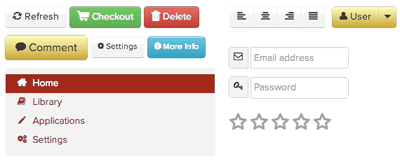
A trend has emerged recently of using fonts for icons (well, I say emerged, but Webdings arrived in 1997). The icons are vector graphics, which means they scale well at any size and on any platform (in theory), such as the mobile platform. They are quite useful for menus, buttons, forms and whenever you want to break the text silence with a small icon. They speed up your site and your design process.
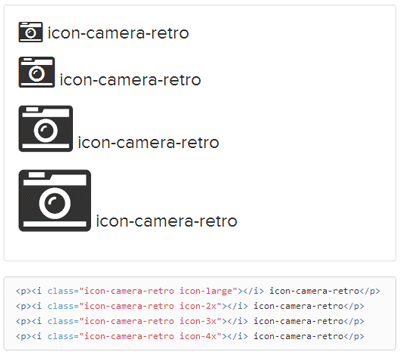
There are plenty of icon fonts, just Google it. My favorite is Font Awesome (new tab), and here is an example of using it:
 (enlarge)
Website: https://fontawesome.com/ (new tab)
NuGet: PM> Install-Package FontAwesome
5 – CSS Frameworks
 (enlarge)
If you’ve read this far, congratulations: here is the ultimate library that will save you time and help you deliver faster.
A CSS framework is meant to get you up to speed with the basic stuff that you do every time you start a new website. Things like normalizing CSS (check point 1 of this post), setting padding and margins, forms design, making your site responsive (so it reacts well when resized for phones and tablets), animation, cool buttons, modal dialogs, font icons (check point 4 of this post), relying on CSS generators (check point 3), modern alerts, and more!
There are hundreds of CSS frameworks. Some are generic and some focus on certain areas (such as being more responsive or having special features for mobile). The top two are Twitter Bootstrap (new tab) and Zurb Foundation (new tab). A full comparison between them is beyond the scope of this post (Google “Bootstrap vs Foundation” and enjoy), but here are some quick points:
- Twitter Bootstrap is more popular due to the brand and the amount of plugins.
- Zurb Foundation has a better layout grid; however, at the time of writing, Bootstrap is preparing a new grid in release 3, which is currently in beta.
- Bootstrap uses LESS (review point 3).
- Foundation uses SASS.
- Both use CSS3 and jQuery.
- While you can’t compare them directly, using one of them removes the need for jQuery UI (I am talking about jQuery UI and not jQuery).
You could even find free and commercial templates based on these two frameworks that will definitely save you more time, especially if the project is low-budget and/or for intranet use. Here is a popular site for Bootstrap templates: {wrap}bootstrap (new tab).
There is much more to say about CSS frameworks, but the point here is to get you interested rather than to be a tutorial or a reference.
Websites: https://getbootstrap.com/ (new tab) & https://get.foundation/ (new tab)
NuGet: PM> Install-Package Twitter.Bootstrap.Less & PM> Install-Package Foundation4.MVC4
Conclusion
DRY and don’t reinvent the wheel are the points I wanted to make with this post. I hope I highlighted at least one library you didn’t know about, and that it makes your day. Please feel free to mention any libraries you think are missing in the comments.