 (enlarge)
Session expiration in ASP.NET is a nasty problem. Imagine filling out a long form and hitting submit, and then — boom — you get the login page. That has happened to me, and probably to you.
This problem doesn’t have an out-of-the-box solution in ASP.NET and there are different approaches to solve it.
- Increasing the session timeout. You are probably aware of the drawbacks of this approach, mainly that it consumes more server resources.
- Having an image or an iframe that refreshes regularly and requests the server. This approach is a per-page approach and you can select the pages to implement it on.
Personally, I’ve been using the second approach for a long time and haven’t had any problems with it. However, I made it more reusable, not to mention “cleaner”, by making it a web control.
If you are just interested in using the control then you can skip to the last section “Using the Control.”
Architecture
The architecture here is simple and consists of both server-side and client-side solutions.
Server-Side
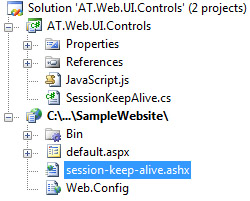
An ASHX handler file sits at the root of the site and, when requested, renews the session and returns a 1-pixel image. In my control, I called the ASHX file session-keep-alive.ashx and this is the code:
<%@WebHandler Language="C#" Class="session_keep_alive">
using System.Web;
using System.Web.SessionState;

public class session_keep_alive :
  IHttpHandler, IRequiresSessionState
{
  private static byte[] gif =
    {
      0x47,0x49,0x46,0x38,0x39,0x61,0x01,0x00,0x01,0x00,0x91,
      0x00,0x00,0x00,0x00,0x00,0x00,0x00,0x00,0x00,0x00,0x00,
      0x00,0x00,0x00,0x21,0xf9,0x04,0x09,0x00,0x00,0x00,0x00,
      0x2c,0x00,0x00,0x00,0x00,0x01,0x00,0x01,0x00,0x00,0x08,
      0x04,0x00,0x01,0x04,0x04,0x00,0x3b,0x00
    };

  public void ProcessRequest (HttpContext context)
  {
    context.Response.ContentType = "image/gif";
    context.Response.Cache.SetCacheability(
                                HttpCacheability.NoCache);
    context.Response.BinaryWrite(gif);
    context.Response.End();
  }

  public bool IsReusable {
    get
    {
      return true;
    }
  }

}
Client-Side
On the client, my web control will render a 1-pixel image and some JavaScript code that will refresh the image every set amount of time from the ASHX file on the server. This is the control’s code:
using System;
using System.Web.UI;
using System.Web.UI.HtmlControls;
using System.ComponentModel;

namespace AT.Web.UI.Controls
{

/// <summary>
/// Web control to keep the session alive by refreshing
/// every set amount of time
/// </summary>
[AspNetHostingPermission(SecurityAction.InheritanceDemand,
    Level = AspNetHostingPermissionLevel.Minimal)]
[AspNetHostingPermission(SecurityAction.LinkDemand,
    Level = AspNetHostingPermissionLevel.Minimal)]
[ToolboxData("<{0}:SessionKeepAlive runat=server />")]
public class SessionKeepAlive : WebControl {

/// <summary>
/// Set, in minutes, the duration to trigger the session.
/// The default value is one minute
/// </summary>
[Category("Behavior")]
[DefaultValue(1)]
public int Duration {
  get
  {
    return (int)(ViewState["Duration"] ??  1);
  }
  set
  {
    ViewState["Duration"] = value;
  }
}

/// <summary>
/// The path of the image's URL that will be requested from the
/// server, the default is ~/session-keep-alive.ashx
/// </summary>
[Category("Behavior")]
[DefaultValue("~/session-keep-alive.ashx")]
public string PageUrl
{
  get
  {
    return (string)(ViewState["PageUrl"] ?? "~/session-keep-alive.ashx");
  }
  set
  {
    ViewState["PageUrl"] = value;
  }
}

/// <summary>
/// Applies in-line CSS style to hide the generated image.
/// The default is true. Alternatively, you can set this to false
/// and hide the image using your own CSS to keep your page
/// XHTML Strict compatible.
/// </summary>
[Category("Behavior")]
[DefaultValue(true)]
public bool AutoHide
{
  get
  {
    return (bool)(ViewState["AutoHide"] ?? true);
  }
  set
  {
    ViewState["AutoHide"] = value;
  }
}

protected override void OnPreRender(EventArgs e) {
  base.OnPreRender(e);

  if (AutoHide)
  {
    this.Style.Add(HtmlTextWriterStyle.Display, "none");
  }

  Page.ClientScript.RegisterClientScriptResource(
    typeof(SessionKeepAlive),
    "AT.Web.UI.Controls.JavaScript.js");

  Page.ClientScript.RegisterStartupScript(
    typeof(SessionKeepAlive), "SessionKeepAlive",

  string.Format(
    @"window.setInterval('SessionKeepAlive(\'{0}\', \'{1}\');', {2});",
    ClientID, ResolveClientUrl(PageUrl), Duration * 60000), true);
}

protected override void Render(HtmlTextWriter writer)
{
  writer.AddAttribute(
    HtmlTextWriterAttribute.Src, ResolveClientUrl(PageUrl));
    writer.AddAttribute(HtmlTextWriterAttribute.Alt, " ");
    base.RenderBeginTag(writer);
    base.RenderEndTag(writer);
}

}
}
And here is the JavaScript used, note that I am setting the Src of the image to
the same location (the ASHX file), but changing the query string to prevent the
browser from caching the request.
function SessionKeepAlive(imageID, pageUrl)
{
  var imageObj = document.getElementById(imageID);
  if (imageObj == null || imageObj == undefined)
  {
    return;
  }
  imageObj.src = pageUrl + "?par=" +
          escape((new Date()).toString());
}
Using the JavaScript as an embedded resource
I have made the JavaScript file an embedded resource to make it easier for deployment. To do that I had to do the following:
- Added a JavaScript file to the project library and called it JavaScript.js.
- Made this file an embedded resource by selecting it and setting Build Action to Embedded Resource.
- Added the following line to AssemblyInfo.cs:
[assembly: WebResource("AT.Web.UI.Controls.JavaScript.js","application/x-javascript")]
Using the Control
- Copy
session-keep-alive.ashxto your website. - Reference
AT.Web.UI.Controls.dllin your website. - You can add this control to the VS.NET toolbox OR you could add it manually by adding
<%@ Register TagPrefix="at" Namespace="AT.Web.UI.Controls" Assembly="AT.Web.UI.Controls" %>to the top of the page and adding<at:SessionKeepAlive ID="SessionKeepAlive1" runat="server" />anywhere in the HTML body. You might need to set the refreshDuration,AutoHideorPageUrl.
Check the sample file for more information.
Credits
The initial code that I used two years ago was based on an article, Make session last forever, written by Gevorg on Code Project (new tab).
All suggestions and bug reports are welcome.