 (enlarge)
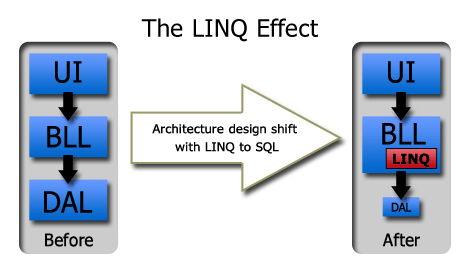
In the pre-LINQ days, I used to use the classical 3-tier architecture for designing ASP.NET web projects: the user interface (UI), the business logic layer (BLL) and the data access layer (DAL).
My DAL used to rely on Microsoft’s Data Access Application Block (DAAB) which abstracted the repetitive and boring ADO.NET implementations. There are some third-party tools such as SubSonic, which shares some features with LINQ, or NHibernate (new tab); however, I would rather use the Enterprise Library.
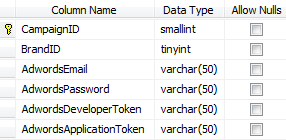
Let me quickly illustrate the way to solve a problem with the classical architecture. This is a simple business problem: a website has many brands, and each brand has an advertising campaign. To access the campaign stats, which are supplied by the campaign agency, we need to access the agency’s web service by providing our brand credentials. We simply store these login credentials in our database -> retrieve login info of a brand -> call the web service -> display the stats on a web page.
 (enlarge)
I did not choose a trivial problem like the Company-Employee one as I wanted a real-life problem which I had experienced myself.
A stored procedure that fetches a campaign credential for a brand from the campaign table could look like this:
ALTER PROCEDURE dbo.GetCampaignPerBrand

@BrandID TINYINT,
@AdwordsEmail VARCHAR(50) OUTPUT,
@AdwordsPassword VARCHAR(50) OUTPUT,
@AdwordsDeveloperToken VARCHAR(50) OUTPUT,
@AdwordsApplicationToken VARCHAR(50) OUTPUT,
@AdwordsClientEmail VARCHAR(50) OUTPUT

AS
BEGIN

SELECT	@AdwordsEmail = AdwordsEmail,
@AdwordsPassword = AdwordsPassword,
@AdwordsDeveloperToken = AdwordsDeveloperToken,
@AdwordsApplicationToken = AdwordsApplicationToken,
@AdwordsClientEmail = AdwordsClientEmail
FROM Campaign
WHERE BrandID = @BrandID
END
And a class, in the DAL, that would consume this method would look like:
public static class CampaignDAL {

// More code ...
public static void GetCampaignPerBrand(byte brandID, out string adwordsEmail,
out string adwordsPassword, out string adwordsDeveloperToken,
out string adwordsApplicationToken, out string adwordsClientEmail) {

    // Using Microsoft's DAAB from the Microsoft Enterprise Library
    Database db = DatabaseFactory.CreateDatabase();
    DbCommand command = db.GetStoredProcCommand("GetCampaignPerBrand");

    db.AddInParameter(command, "BrandID", DbType.Byte, brandID);

    db.AddOutParameter(command,
      "AdwordsEmail", DbType.AnsiString, 50);
    db.AddOutParameter(command,
      "AdwordsPassword", DbType.AnsiString, 50);
    db.AddOutParameter(command,
      "AdwordsDeveloperToken", DbType.AnsiString, 50);
    db.AddOutParameter(command,
      "AdwordsApplicationToken", DbType.AnsiString, 50);
    db.AddOutParameter(command,
      "AdwordsClientEmail", DbType.AnsiString, 50);

    db.ExecuteNonQuery(command);

    object adwordsEmailObj           =
      db.GetParameterValue(command, "AdwordsEmail");
    object adwordsPasswordObj        =
      db.GetParameterValue(command, "AdwordsPassword");
    object adwordsDeveloperTokenObj  =
      db.GetParameterValue(command, "AdwordsDeveloperToken");
    object adwordsApplicationTokenObj=
      db.GetParameterValue(command, "AdwordsApplicationToken");
    object adwordsClientEmailObj     =
      db.GetParameterValue(command, "AdwordsClientEmail");

    adwordsEmail             =
      adwordsEmailObj == DBNull.Value ? null : (string) adwordsEmailObj;
    adwordsPassword          =
      adwordsPasswordObj == DBNull.Value ? null : (string)adwordsPasswordObj;
    adwordsDeveloperToken    =
      adwordsDeveloperTokenObj == DBNull.Value ? null : (string)adwordsDeveloperTokenObj;
    adwordsApplicationToken  =
      adwordsApplicationTokenObj == DBNull.Value ? null : (string)adwordsApplicationTokenObj;
    adwordsClientEmail       =
      adwordsClientEmailObj == DBNull.Value ? null : (string)adwordsClientEmailObj;
}
// More code ...
}
The purists among us might argue that I should be using a Data Container (DC) to carry the data from the BLL to the DAL. Yes, that is a good solution, but I am after something simpler here. Now a method in the associated business logic layer might look like this:
public class CampaignBLL {

// More code..
public Stats[] GetStats() {
    byte brandID = Brand.CurrentBrand.BrandID;
    string adwordsEmail, adwordsPassword, adwordsDeveloperToken,
      adwordsApplicationToken, adwordsClientEmail;

    GetCampaignPerBrand(brandID, out adwordsEmail, out adwordsPassword,
      out adwordsDeveloperToken, out adwordsApplicationToken, out adwordsClientEmail);

    Stats[] stats = new Stats();
    // Use the retrieved values in calling a
    // web service and do other stuff to fill the stats array

    return stats;
}
// More code..

}
The advantage of this approach is that I was pushing my SQL into stored procs which, as I was convincing myself, was giving me extra performance in addition to semi-portability (as the T-SQL will need to be rewritten when taken to another RDBMS). I had created a CodeSmith (new tab) template to generate the code, which saved me writing it by hand; with more complex stored procedures, writing such code is error-prone, and the errors are most likely to show up at run time.
The disadvantages are too much code to achieve a simple task, no IntelliSense for the column names (there are third-party solutions for this which cost money), no compile-time checking for misspellings of stored proc and column names, semi-portable Transact SQL and the code is split into multiple locations/projects.
When I started designing an architecture based on .NET 3.5 of a mid-sized project, I was struggling with the DAL. I tried to force the use of the DAL with LINQ, only to find that I was complicating the architecture rather than simplifying it. If LINQ deals with the database transparently and returns my data containers (DC) directly in a strongly typed format, then I don’t need code such as the above.
To DAL or Not to DAL, That Is the Question
Some evil thoughts started going around my head: why do I need a DAL with LINQ at all? I went back to basics and asked what the DAL is for.
DAL Fact: The DAL will hide the DB provider, such as SQL Server or Oracle, and make transitions to another DB much simpler; in theory you will only need to change the implementations of the DAL, or you might not even need to change it if you have your own abstraction design or are using a library such as EntLib DAAB.
LINQ Fact: The same goes for LINQ. Additional LINQ implementations, other than the SQL Server one, are currently available or in development.
DAL Fact: The DAL will abstract the DB layer for the BLL and transform the database data types into .NET ones.
LINQ Fact: LINQ takes this a step further and returns strongly-typed data containers rather than dummy DataSets.
At First I Was Afraid, I Was Petrified
Shrinking the DAL, or removing it completely? Merging the DAL and the BLL was bold indeed, but I did it. My architecture turned out to be much simpler and easier to change. Here is a code snippet from the new LINQ-based model:
public class CampaignBLL {

// More code..

public Stats[] GetStats() {
    byte brandID = Brand.CurrentBrand.BrandID;

    DataClassesDataContext db = new DataClassesDataContext();

    // using lambda expressions to make my life even easier.
    Campaign campaign = db.Campaigns.Single(c => c.BrandID == brandID);

    Stats[] stats = new Stats();
    // Use the retrieved object in calling a
    // web service and do other stuff to fill the stats array

    return stats;
}

// More code...

}
Where Did the Code Go?!
Let us go back to one of the most famous laws of physics — yes, physics, I didn’t mistype:
Conservation of Energy Law: Energy cannot be created or destroyed, but can change its form.
The same applies to code. Code cannot suddenly disappear without changing to another form. The code generated by LINQ to SQL has reduced the amount of code to be written. With LINQ, usually developers tend to write fewer stored procedures as the performance benefit is negligible when compared to that of cleaner code and better architecture (you guessed it, I am a “better architecture” against “higher performance” type of developer).
Someone might argue that the DAL still exists in the LINQ-generated code. Well, yes, but what is important to me is that I didn’t have to do it and I can hardly see it. My concern is what I have to do to get the project going, and I no longer mind “outsourcing” my DAL.
Some developers try to keep their DAL by putting their LINQ statements inside it, in methods that are two or three lines long. I believe they fear change. Some go a step further by returning IQueryable objects. I wouldn’t have taken such an approach as I know that other developers will be working on the project and it is not just me.
DAL Shrinking Advantages
In the classical DAL architecture, each change in the database structure requires searching for the associated stored procedure, then changing the related DAL method(s), then changing the related business method(s) — and that assumes you didn’t miss a change along the way.
With LINQ you automatically shift to fewer stored procedures. Now a change in the database requires only a LINQ recompilation and a change in the business layer. If you’ve missed anything, you will get a compile-time error.
The code is easier to read, shorter and still portable, as more and more RDBMS providers are being added to LINQ.
Finally
Even though the project that I have applied these principles to is mid-sized and the database operations are mostly reading, I am still wondering if this approach is going to work in enterprise projects or projects with intensive write and update operations.
In the next post I am going to illustrate how I used CodeSmith’s PLINQO (new tab) template and created a simple architecture that made using LINQ a breeze. The result of this architecture was a scalable project which took less development time than it usually takes. It is an end-to-end architecture with a fully functional commercial project. I will keep you posted; check back in the next few days or subscribe to my RSS feed.
Leave me a comment if you have any suggestions, or if you agree or disagree with my approach.